Kubernetes security is not only about network traffic. NetworkPolicy controls which pods can talk to each other, but it does not control what a container can do after it is running.
That is where securityContext and Pod Security Admission come in.
In this lab, I used an Amazon EKS cluster to test:
- A default container running as root
runAsNonRootrunAsUserandrunAsGroupreadOnlyRootFilesystememptyDiras an explicit writable pathallowPrivilegeEscalation: false- Dropping Linux capabilities
seccompProfile: RuntimeDefault- Namespace-level Pod Security Admission with
restricted
SecurityContext vs NetworkPolicy
NetworkPolicy answers:
Who can talk to whom?
SecurityContext answers:
What is this container allowed to do at runtime?
They solve different problems.
NetworkPolicy reduces network blast radius. SecurityContext reduces runtime and container blast radius.
In production, they complement each other.
Baseline: A Default BusyBox Pod Runs as Root
I started with a simple BusyBox pod:
apiVersion: v1
kind: Pod
metadata:
  name: root-check
spec:
  containers:
    - name: app
      image: busybox
      command:
        - /bin/sh
        - -c
      args:
        - sleep 3600
Apply it:
kubectl apply -f root-check-pod.yaml
kubectl get pods
Then inspect the user inside the container:
kubectl exec root-check -- id
Output:
uid=0(root) gid=0(root) groups=0(root),10(wheel)
That means the process is running as root inside the container.
I also verified that the pod could write to /tmp:
kubectl exec root-check -- sh -c 'echo test > /tmp/testfile && cat /tmp/testfile'
Output:
test
Container Root Is Not Automatically Host Root
Running as root inside a container does not automatically mean root access to the EC2 worker node.
The important distinction is:
container root != host root
But running as root is still risky. It becomes especially dangerous when combined with:
privileged: truehostPathmountshostNetworkhostPID- extra Linux capabilities
- container runtime or kernel vulnerabilities
The goal is to reduce what a compromised container can do.
Enforcing Non-Root with runAsNonRoot
Next, I tried to force BusyBox to run as non-root:
apiVersion: v1
kind: Pod
metadata:
  name: nonroot-busybox
spec:
  securityContext:
    runAsNonRoot: true
  containers:
    - name: app
      image: busybox
      command:
        - /bin/sh
        - -c
      args:
        - sleep 3600
Apply:
kubectl apply -f nonroot-busybox.yaml
kubectl get pods
The pod failed with:
CreateContainerConfigError
Why?
BusyBox defaults to root. runAsNonRoot: true does not magically convert the image to a safe non-root image. It tells Kubernetes:
Do not start this container if it would run as UID 0.
Overriding the Image User with runAsUser
Then I explicitly set a non-root UID and GID:
apiVersion: v1
kind: Pod
metadata:
  name: nonroot-uid
spec:
  securityContext:
    runAsNonRoot: true
    runAsUser: 1000
    runAsGroup: 1000
  containers:
    - name: app
      image: busybox
      command:
        - /bin/sh
        - -c
      args:
        - sleep 3600
Apply:
kubectl apply -f nonroot-uid-pod.yaml
kubectl exec nonroot-uid -- id
Output:
uid=1000 gid=1000 groups=1000
This shows that Kubernetes can override the image’s default user with:
runAsUser: 1000
But the pod could still write to /tmp:
kubectl exec nonroot-uid -- sh -c 'echo test > /tmp/testfile && cat /tmp/testfile'
Output:
test
That proves an important point:
runAsNonRoot controls identity.
readOnlyRootFilesystem controls filesystem writability.

Making the Root Filesystem Read-Only
Next, I added readOnlyRootFilesystem: true.
apiVersion: v1
kind: Pod
metadata:
  name: readonly-rootfs
spec:
  securityContext:
    runAsNonRoot: true
    runAsUser: 1000
    runAsGroup: 1000
  containers:
    - name: app
      image: busybox
      command:
        - /bin/sh
        - -c
      args:
        - sleep 3600
      securityContext:
        readOnlyRootFilesystem: true
Apply:
kubectl apply -f readonly-rootfs-pod.yaml
kubectl exec readonly-rootfs -- id
kubectl exec readonly-rootfs -- sh -c 'echo test > /tmp/testfile'
The write failed:
sh: can't create /tmp/testfile: Read-only file system
readOnlyRootFilesystem is a container-level setting because each container has its own root filesystem from its image.
It cannot be set at the pod level.
Adding an Explicit Writable /tmp with emptyDir
Applications often need temporary writable space. The better pattern is:
read-only root filesystem
+ explicit writable mounts only where needed
I mounted an emptyDir volume at /tmp:
apiVersion: v1
kind: Pod
metadata:
  name: readonly-rootfs-with-tmp
spec:
  securityContext:
    runAsNonRoot: true
    runAsUser: 1000
    runAsGroup: 1000
  containers:
    - name: app
      image: busybox
      command:
        - /bin/sh
        - -c
      args:
        - sleep 3600
      securityContext:
        readOnlyRootFilesystem: true
      volumeMounts:
        - name: tmp
          mountPath: /tmp
  volumes:
    - name: tmp
      emptyDir: {}
Apply:
kubectl apply -f readonly-rootfs-with-tmp.yaml
Writing to /tmp worked:
kubectl exec readonly-rootfs-with-tmp -- sh -c 'echo test > /tmp/testfile && cat /tmp/testfile'
Output:
test
Writing to /etc failed:
kubectl exec readonly-rootfs-with-tmp -- sh -c 'echo test > /etc/testfile'
Output:
sh: can't create /etc/testfile: Read-only file system
This is the hardening pattern I wanted:
/tmp is writable through emptyDir
/etc and the rest of the container root filesystem remain read-only
What Is emptyDir?
emptyDir is temporary pod-local storage.
It is created when the pod is assigned to a node and deleted when the pod is deleted.
The lifecycle is:
container restart -> emptyDir data stays
pod deletion      -> emptyDir data is deleted
It is useful for:
- scratch space
/tmpwith a read-only root filesystem- sharing files between containers in the same pod
- temporary cache data
It is not persistent storage. For persistent data, use a PVC.
Fully Hardened Pod
Then I added the next hardening controls:
allowPrivilegeEscalation: false
capabilities:
  drop:
    - ALL
seccompProfile:
  type: RuntimeDefault
Full manifest:
apiVersion: v1
kind: Pod
metadata:
  name: hardened-pod
spec:
  securityContext:
    runAsNonRoot: true
    runAsUser: 1000
    runAsGroup: 1000
    seccompProfile:
      type: RuntimeDefault
  containers:
    - name: app
      image: busybox
      command:
        - /bin/sh
        - -c
      args:
        - sleep 3600
      securityContext:
        readOnlyRootFilesystem: true
        allowPrivilegeEscalation: false
        capabilities:
          drop:
            - ALL
      volumeMounts:
        - name: tmp
          mountPath: /tmp
  volumes:
    - name: tmp
      emptyDir: {}
Apply:
kubectl apply -f hardened-pod.yaml
kubectl get pods
Verifying the Hardened Pod
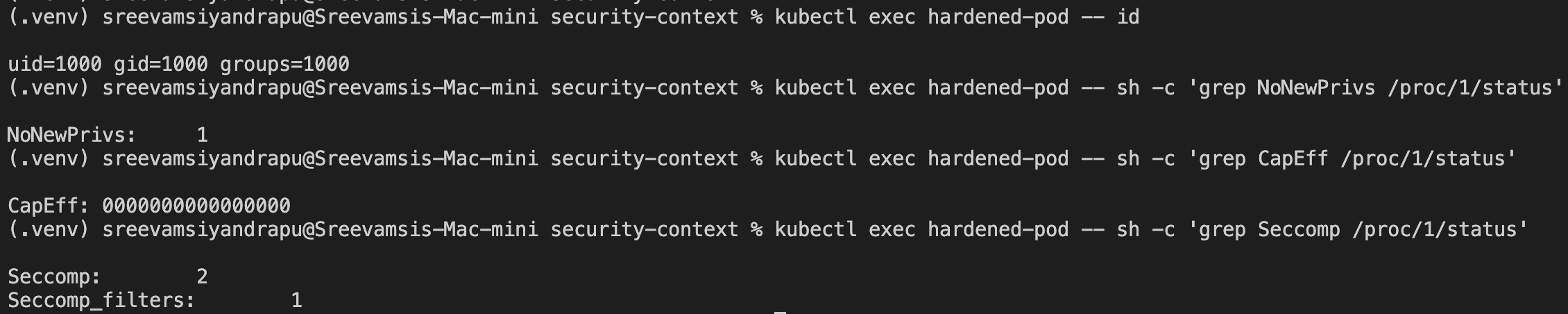
I verified the effective security settings from inside the container.
Check user:
kubectl exec hardened-pod -- id
Output:
uid=1000 gid=1000 groups=1000
Check privilege escalation:
kubectl exec hardened-pod -- sh -c 'grep NoNewPrivs /proc/1/status'
kubectl exec root-check -- sh -c 'grep NoNewPrivs /proc/1/status'
Output:
hardened-pod: NoNewPrivs: 1
root-check:   NoNewPrivs: 0
Check effective Linux capabilities:
kubectl exec hardened-pod -- sh -c 'grep CapEff /proc/1/status'
kubectl exec root-check -- sh -c 'grep CapEff /proc/1/status'
Output:
hardened-pod: CapEff: 0000000000000000
root-check:   CapEff: 00000000a80425fb
Check seccomp:
kubectl exec hardened-pod -- sh -c 'grep Seccomp /proc/1/status'
kubectl exec root-check -- sh -c 'grep Seccomp /proc/1/status'
Output:
hardened-pod:
  Seccomp:         2
  Seccomp_filters: 1

root-check:
  Seccomp:         0
  Seccomp_filters: 0
This proves the hardened pod has:
- non-root UID
- no privilege escalation
- zero effective Linux capabilities
- seccomp filtering enabled
- read-only root filesystem
- explicit writable
/tmp
Pod Security Admission
SecurityContext configures individual pods and containers.
Pod Security Admission enforces security rules at the namespace level.
The mental model:
SecurityContext:
  This pod should run safely.

Pod Security Admission:
  This namespace rejects pods that are not safe enough.
Kubernetes includes three Pod Security Standards:
privileged
baseline
restricted
For this lab, I used restricted.
Enforcing restricted on a Namespace
Create a namespace:
kubectl create namespace pod-security-demo
Label it:
kubectl label namespace pod-security-demo \
  pod-security.kubernetes.io/enforce=restricted \
  pod-security.kubernetes.io/enforce-version=latest
Verify:
kubectl get namespace pod-security-demo --show-labels
Unsafe Pod Rejected
Then I tried to create an unsafe pod in the restricted namespace:
apiVersion: v1
kind: Pod
metadata:
  name: unsafe-pod
  namespace: pod-security-demo
spec:
  containers:
    - name: app
      image: busybox
      command:
        - /bin/sh
        - -c
      args:
        - sleep 3600
Apply:
kubectl apply -f unsafe-pod.yaml
Kubernetes rejected it:
Error from server (Forbidden): pods "unsafe-pod" is forbidden:
violates PodSecurity "restricted:latest":
allowPrivilegeEscalation != false
unrestricted capabilities
runAsNonRoot != true
seccompProfile must be RuntimeDefault or Localhost
This is namespace-level enforcement working.
Restricted Pod Accepted
Then I created a compliant pod:
apiVersion: v1
kind: Pod
metadata:
  name: restricted-pod
  namespace: pod-security-demo
spec:
  securityContext:
    runAsNonRoot: true
    runAsUser: 1000
    runAsGroup: 1000
    seccompProfile:
      type: RuntimeDefault
  containers:
    - name: app
      image: busybox
      command:
        - /bin/sh
        - -c
      args:
        - sleep 3600
      securityContext:
        allowPrivilegeEscalation: false
        capabilities:
          drop:
            - ALL
        readOnlyRootFilesystem: true
      volumeMounts:
        - name: tmp
          mountPath: /tmp
  volumes:
    - name: tmp
      emptyDir: {}
Apply:
kubectl apply -f restricted-pod.yaml
kubectl get pods -n pod-security-demo
Output:
restricted-pod 1/1 Running

Cleanup
Delete the demo pods:
kubectl delete pod root-check nonroot-busybox nonroot-uid readonly-rootfs readonly-rootfs-with-tmp hardened-pod --ignore-not-found
kubectl delete namespace pod-security-demo --ignore-not-found
Key Takeaways
runAsNonRoot prevents containers from running as UID 0.
runAsUser can override the image’s default user, if the image can run as that UID.
readOnlyRootFilesystem makes the container root filesystem read-only.
emptyDir gives a pod explicit temporary writable storage.
allowPrivilegeEscalation: false sets NoNewPrivs: 1.
Dropping all capabilities results in:
CapEff: 0000000000000000
seccompProfile: RuntimeDefault enables syscall filtering:
Seccomp: 2
Pod Security Admission can enforce these standards at the namespace level.
Final Mental Model
NetworkPolicy:
  Restricts network paths.

SecurityContext:
  Restricts container runtime permissions.

Pod Security Admission:
  Enforces security requirements for an entire namespace.
Together, these controls reduce the blast radius of compromised workloads.