Kubernetes networking is open by default. If no policy restricts traffic, pods can usually talk to other pods across the cluster.
That default is convenient for learning and early development, but production workloads often need stricter boundaries. A backend should not accept traffic from every pod. A frontend should not necessarily be allowed to call every service or external endpoint.
NetworkPolicy is the Kubernetes object used to define those pod-level traffic rules.
In this lab, I used Amazon EKS with AWS VPC CNI NetworkPolicy enforcement enabled. I tested:
- Default open pod-to-pod traffic
- Default deny ingress
- Allowing traffic by source pod label
- Allowing traffic by source namespace label
- Default deny egress
- Allowing DNS egress
- Allowing only backend egress while blocking internet access
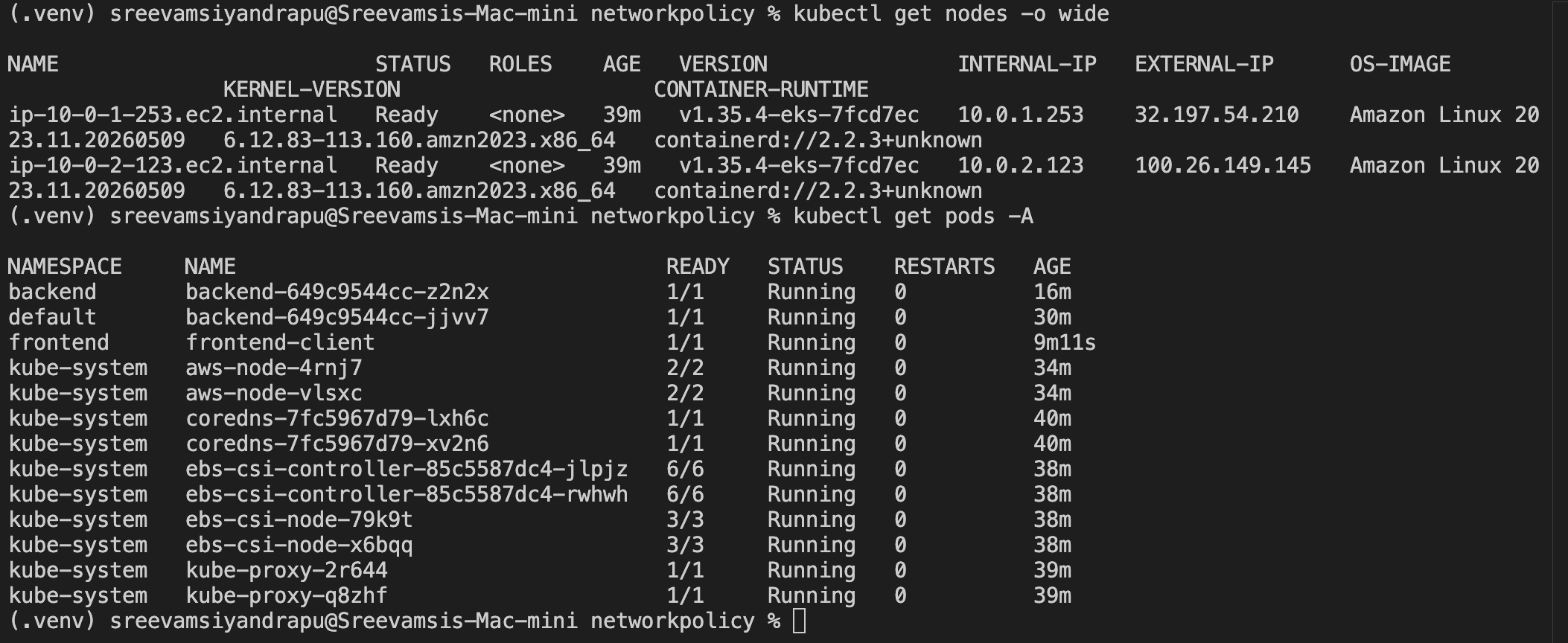
Prerequisite: NetworkPolicy Enforcement
A NetworkPolicy object only works if the cluster networking layer enforces it.
On this EKS cluster, I enabled NetworkPolicy support for the AWS VPC CNI. The key verification was in the aws-node DaemonSet:
--enable-network-policy=true
Useful command:
kubectl describe daemonset -n kube-system aws-node
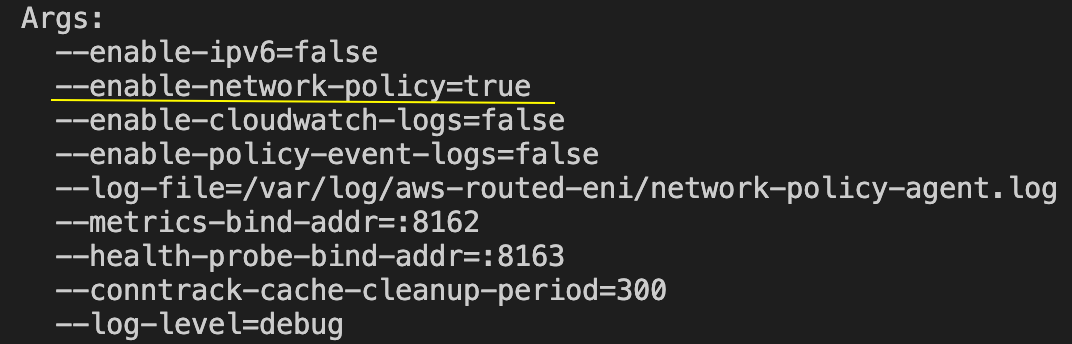
This distinction matters. If enforcement is disabled, NetworkPolicy YAML can still be created, but traffic may not actually be blocked.
Core Mental Model
NetworkPolicy is based on labels and selectors.
It is not based on pod names, Deployment names, or Service names.
The main questions are:
Which pods does this policy apply to?
Which traffic is allowed?
The target pods are selected with:
podSelector:
  matchLabels:
    app: backend
Allowed sources or destinations can be selected using:
podSelector
namespaceSelector
ipBlock
ports
Ingress vs Egress
Ingress controls traffic entering selected pods.
Egress controls traffic leaving selected pods.
Ingress = who can talk into this pod?
Egress  = where can this pod talk out to?
Part 1: Pod Label Based Ingress
First, I deployed a simple backend app and Service in the default namespace.
apiVersion: apps/v1
kind: Deployment
metadata:
  name: backend
spec:
  replicas: 1
  selector:
    matchLabels:
      app: backend
  template:
    metadata:
      labels:
        app: backend
    spec:
      containers:
        - name: nginx
          image: nginx:stable
          ports:
            - containerPort: 80
---
apiVersion: v1
kind: Service
metadata:
  name: backend
spec:
  selector:
    app: backend
  ports:
    - port: 80
      targetPort: 80
Apply it:
kubectl apply -f backend.yaml
kubectl get pods -o wide
kubectl get svc backend

Before applying any policy, traffic worked:
kubectl run test-client \
  --image=curlimages/curl \
  --restart=Never \
  --rm -it \
  -- curl -m 5 -s backend
Expected result:
nginx HTML response
Default Deny Ingress
Then I applied a default deny ingress policy:
apiVersion: networking.k8s.io/v1
kind: NetworkPolicy
metadata:
  name: default-deny-ingress
spec:
  podSelector: {}
  policyTypes:
    - Ingress
This line is the important part:
podSelector: {}
An empty podSelector means:
select all pods in this namespace
Because the policy has policyTypes: [Ingress] and no ingress allow rules, it denies all incoming traffic to all selected pods in that namespace.
Apply it:
kubectl apply -f default-deny-ingress.yaml
kubectl get networkpolicy
kubectl describe networkpolicy default-deny-ingress
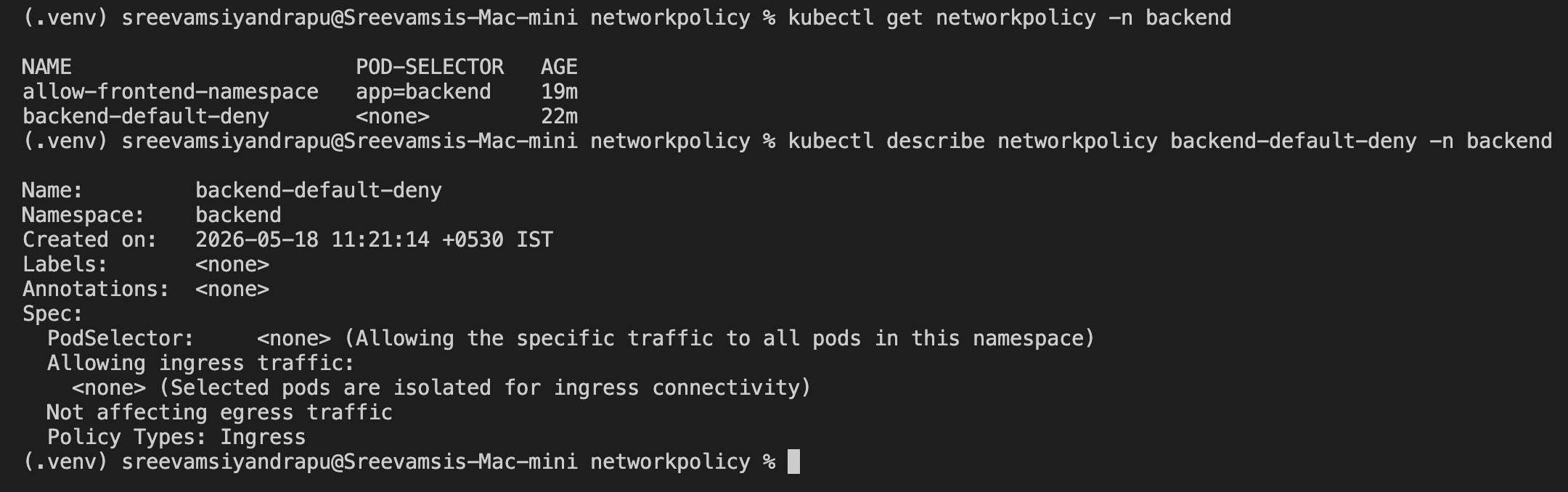
Testing again from an unlabeled client should fail:
kubectl run test-client \
  --image=curlimages/curl \
  --restart=Never \
  --rm -it \
  -- curl -m 5 -s backend
Expected result:
timeout or no response
Allow Only Selected Client Pods
Next, I allowed ingress only from pods with the label:
access=allowed
apiVersion: networking.k8s.io/v1
kind: NetworkPolicy
metadata:
  name: allow-client-to-backend
spec:
  podSelector:
    matchLabels:
      app: backend
  policyTypes:
    - Ingress
  ingress:
    - from:
        - podSelector:
            matchLabels:
              access: allowed
      ports:
        - protocol: TCP
          port: 80
Apply it:
kubectl apply -f allow-client-to-backend.yaml
Unlabeled client should still fail:
kubectl run blocked-client \
  --image=curlimages/curl \
  --restart=Never \
  --rm -it \
  -- curl -m 5 -s backend
Labeled client should work:
kubectl run allowed-client \
  --image=curlimages/curl \
  --labels=access=allowed \
  --restart=Never \
  --rm -it \
  -- curl -m 5 -s backend
Expected result:
blocked-client: timeout
allowed-client: nginx HTML response
Part 2: Namespace Based Ingress
Real clusters usually separate workloads into namespaces. A common pattern is:
frontend namespace -> backend namespace
random namespace   -> blocked
I created two namespaces:
kubectl create namespace frontend
kubectl create namespace backend
Then I labeled the frontend namespace:
kubectl label namespace frontend access=frontend
kubectl get namespaces --show-labels
The backend app was deployed into the backend namespace:
kubectl apply -f backend-ns.yaml
kubectl get pods -n backend
kubectl get svc -n backend
The service DNS name was:
backend.backend.svc.cluster.local
Before policy, a frontend client could reach it:
kubectl run frontend-client \
  -n frontend \
  --image=curlimages/curl \
  --restart=Never \
  --rm -it \
  -- curl -m 5 -s backend.backend.svc.cluster.local
Default Deny in the Backend Namespace
I applied a default deny ingress policy inside the backend namespace:
apiVersion: networking.k8s.io/v1
kind: NetworkPolicy
metadata:
  name: backend-default-deny
  namespace: backend
spec:
  podSelector: {}
  policyTypes:
    - Ingress
Apply:
kubectl apply -f backend-default-deny.yaml
After this, traffic from frontend to backend was blocked.
Allow the Frontend Namespace
Then I allowed traffic from namespaces with:
access=frontend
apiVersion: networking.k8s.io/v1
kind: NetworkPolicy
metadata:
  name: allow-frontend-namespace
  namespace: backend
spec:
  podSelector:
    matchLabels:
      app: backend
  policyTypes:
    - Ingress
  ingress:
    - from:
        - namespaceSelector:
            matchLabels:
              access: frontend
      ports:
        - protocol: TCP
          port: 80
Apply:
kubectl apply -f allow-frontend-namespace.yaml
kubectl describe networkpolicy allow-frontend-namespace -n backend
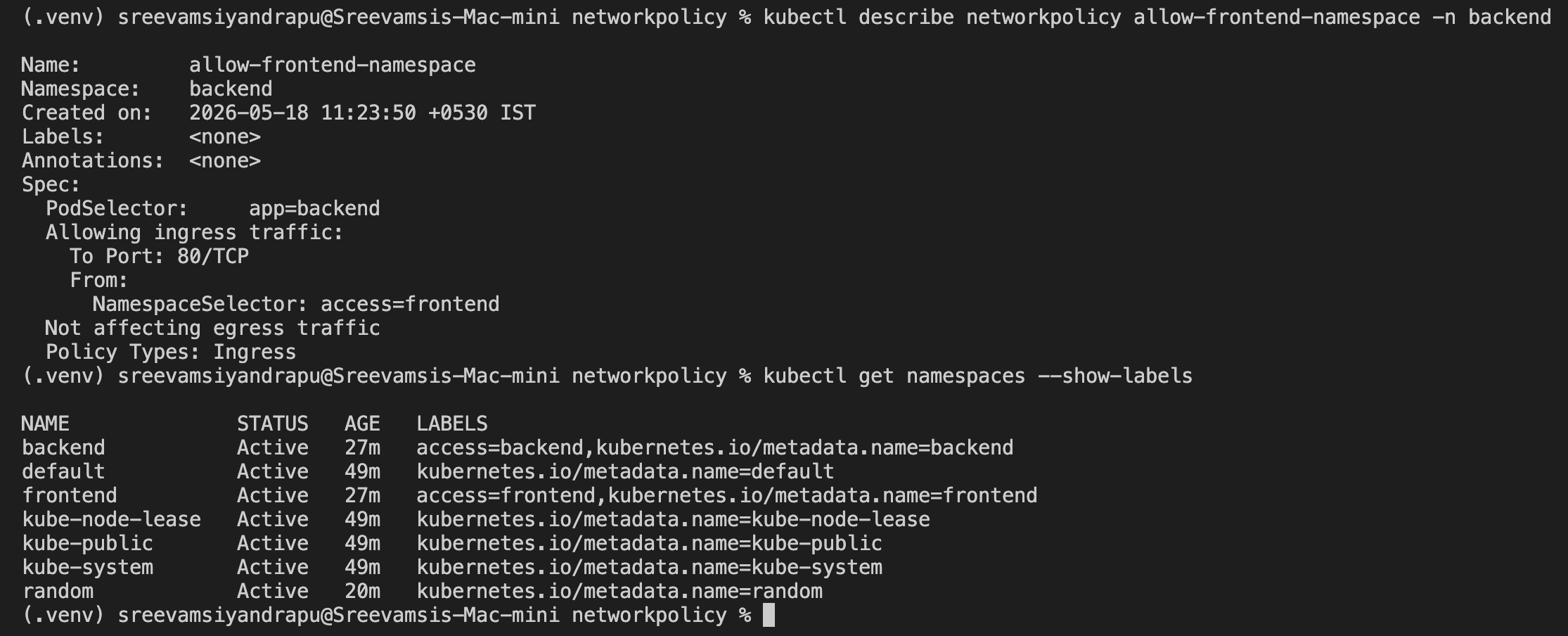
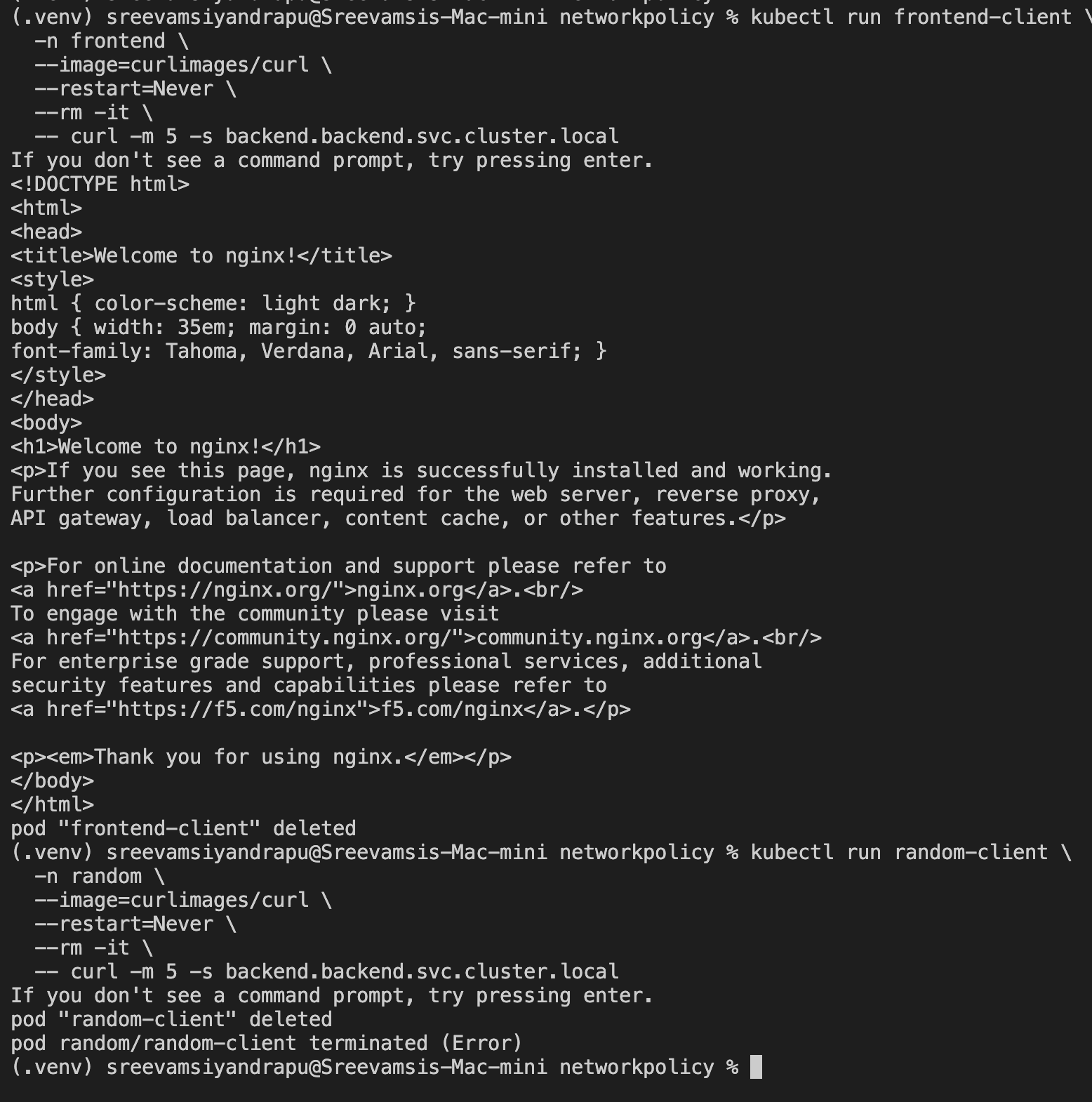
Now the frontend namespace could reach the backend:
kubectl run frontend-client \
  -n frontend \
  --image=curlimages/curl \
  --restart=Never \
  --rm -it \
  -- curl -m 5 -s backend.backend.svc.cluster.local
But a random namespace was still blocked:
kubectl create namespace random

kubectl run random-client \
  -n random \
  --image=curlimages/curl \
  --restart=Never \
  --rm -it \
  -- curl -m 5 -s backend.backend.svc.cluster.local
Expected result:
frontend namespace: nginx HTML response
random namespace: timeout
Part 3: Egress Policy
Ingress controls who can talk into a pod.
Egress controls where a pod can talk out to.
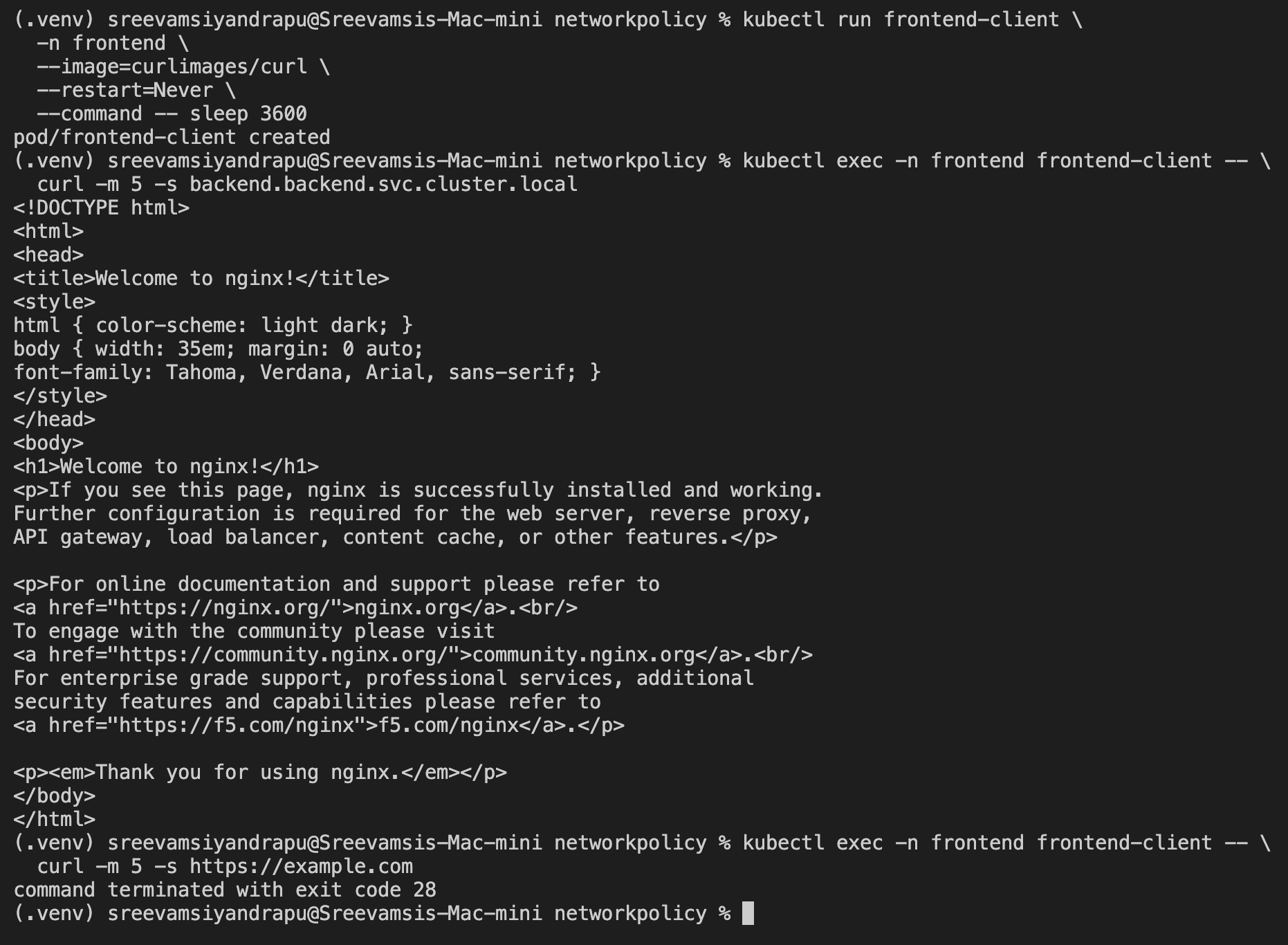
For egress testing, I used a long-running frontend client:
kubectl run frontend-client \
  -n frontend \
  --image=curlimages/curl \
  --restart=Never \
  --command -- sleep 3600
Before applying egress policy, both backend and internet access worked:
kubectl exec -n frontend frontend-client -- \
  curl -m 5 -s backend.backend.svc.cluster.local

kubectl exec -n frontend frontend-client -- \
  curl -m 5 -s https://example.com
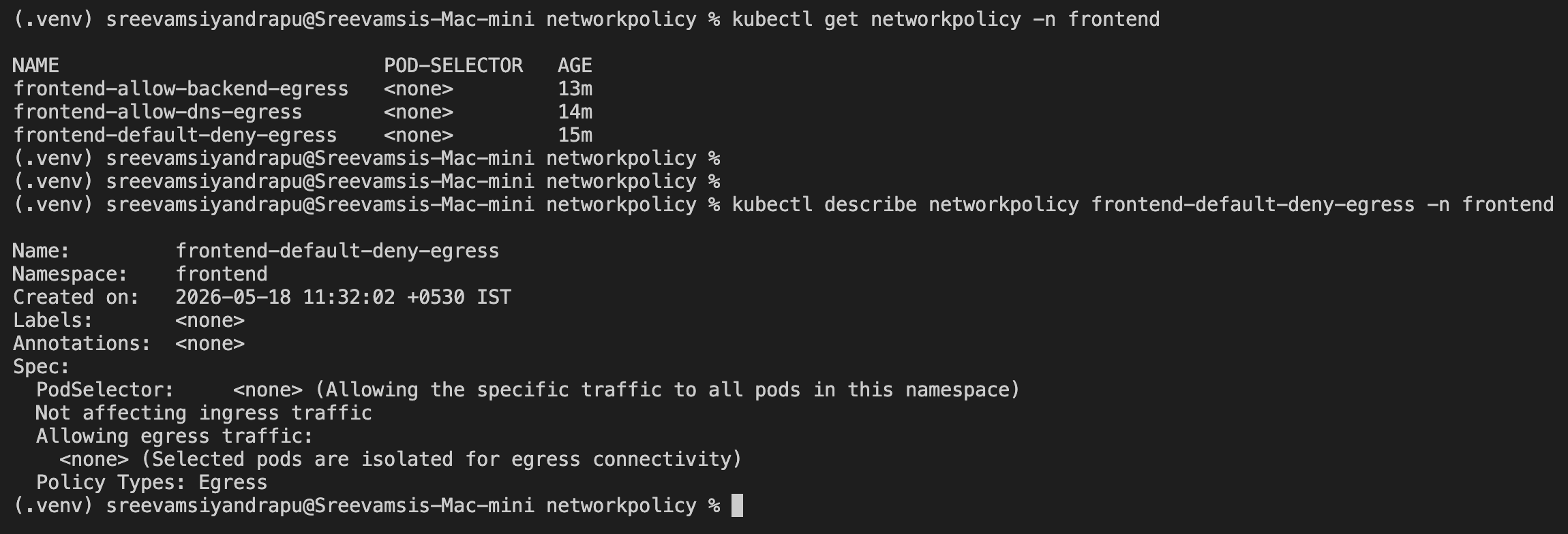
Default Deny Egress
I applied a default deny egress policy in the frontend namespace:
apiVersion: networking.k8s.io/v1
kind: NetworkPolicy
metadata:
  name: frontend-default-deny-egress
  namespace: frontend
spec:
  podSelector: {}
  policyTypes:
    - Egress
Apply:
kubectl apply -f frontend-default-deny-egress.yaml
After this, egress from frontend pods was blocked.
The first practical issue is DNS. Without DNS egress, the pod cannot resolve service names like:
backend.backend.svc.cluster.local
Allow DNS Egress
To restore service discovery, I allowed egress to kube-dns in the kube-system namespace on port 53.
apiVersion: networking.k8s.io/v1
kind: NetworkPolicy
metadata:
  name: frontend-allow-dns-egress
  namespace: frontend
spec:
  podSelector: {}
  policyTypes:
    - Egress
  egress:
    - to:
        - namespaceSelector:
            matchLabels:
              kubernetes.io/metadata.name: kube-system
          podSelector:
            matchLabels:
              k8s-app: kube-dns
      ports:
        - protocol: UDP
          port: 53
        - protocol: TCP
          port: 53
Apply:
kubectl apply -f frontend-allow-dns-egress.yaml
kubectl describe networkpolicy frontend-allow-dns-egress -n frontend
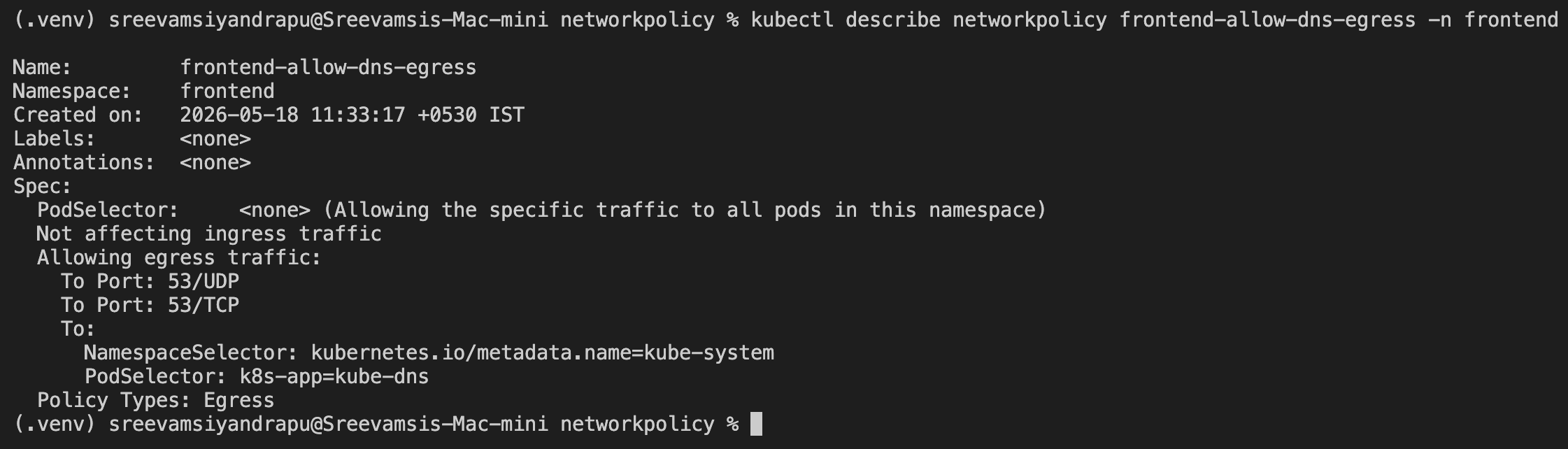
DNS was now allowed, but backend traffic still needed an explicit egress rule.
Allow Backend Egress
I labeled the backend namespace:
kubectl label namespace backend access=backend
Then I allowed frontend pods to reach backend pods on TCP port 80:
apiVersion: networking.k8s.io/v1
kind: NetworkPolicy
metadata:
  name: frontend-allow-backend-egress
  namespace: frontend
spec:
  podSelector: {}
  policyTypes:
    - Egress
  egress:
    - to:
        - namespaceSelector:
            matchLabels:
              access: backend
          podSelector:
            matchLabels:
              app: backend
      ports:
        - protocol: TCP
          port: 80
Apply:
kubectl apply -f frontend-allow-backend-egress.yaml
kubectl describe networkpolicy frontend-allow-backend-egress -n frontend
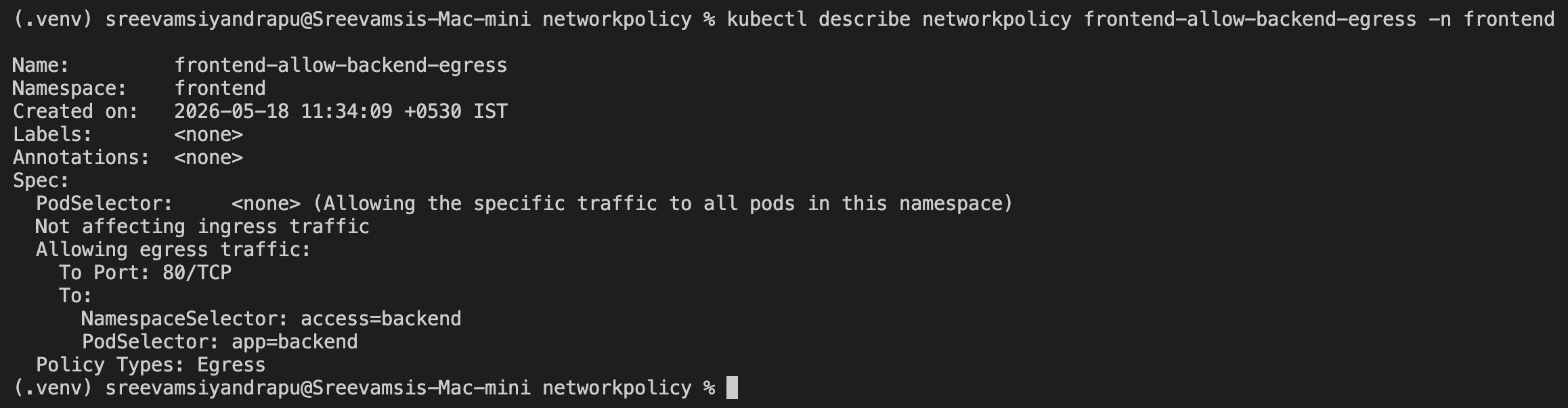
Now backend access worked:
kubectl exec -n frontend frontend-client -- \
  curl -m 5 -s backend.backend.svc.cluster.local
But internet access was still blocked:
kubectl exec -n frontend frontend-client -- \
  curl -m 5 -s https://example.com
Expected result:
backend service: nginx HTML response
example.com: timeout
Important Lessons
NetworkPolicy matching is label-based.
Object names are not the matching mechanism. Labels are.
For example:
metadata:
  name: allow-frontend-namespace
This is just the policy name.
But this selects namespaces:
namespaceSelector:
  matchLabels:
    access: frontend
And this selects pods:
podSelector:
  matchLabels:
    app: backend
NetworkPolicies Are Additive
NetworkPolicies do not behave like ordered firewall rules.
They are additive.
This means multiple policies can combine to define the allowed traffic set.
For egress, these policies worked together:
frontend-default-deny-egress
frontend-allow-dns-egress
frontend-allow-backend-egress
Together, they allowed:
frontend -> kube-dns:53
frontend -> backend:80
And blocked everything else.
Cleanup
Delete the lab resources:
kubectl delete namespace frontend backend random --ignore-not-found
kubectl delete networkpolicy default-deny-ingress allow-client-to-backend --ignore-not-found
kubectl delete deployment backend --ignore-not-found
kubectl delete service backend --ignore-not-found
Final Mental Model
Default Kubernetes networking:
  Open unless restricted.

Default deny NetworkPolicy:
  Close traffic for selected pods.

Allow NetworkPolicy:
  Open only specific paths back up.

Ingress:
  Who can talk into this pod?

Egress:
  Where can this pod talk out to?

DNS:
  Must be explicitly allowed when using default deny egress.
This lab made the core production pattern clear:
Deny by default.
Allow only known traffic paths.
Use labels to define trust boundaries.