Kubernetes is often introduced through long-running workloads like Deployments and Services. That is useful, but it is not the whole workload model.
Some workloads are not meant to run forever. They need to run once, finish, and leave behind a clear success or failure signal. Others need to run on a schedule, like a backup, report, cleanup task, or database maintenance operation.
That is where Kubernetes Job and CronJob resources fit.
In this lab, I used an Amazon EKS cluster to test:
- A simple successful
Job - A failing
JobwithbackoffLimit - A scheduled
CronJob - CronJob
concurrencyPolicyvalues:Allow,Forbid, andReplace - CronJob history limits

Cluster Setup
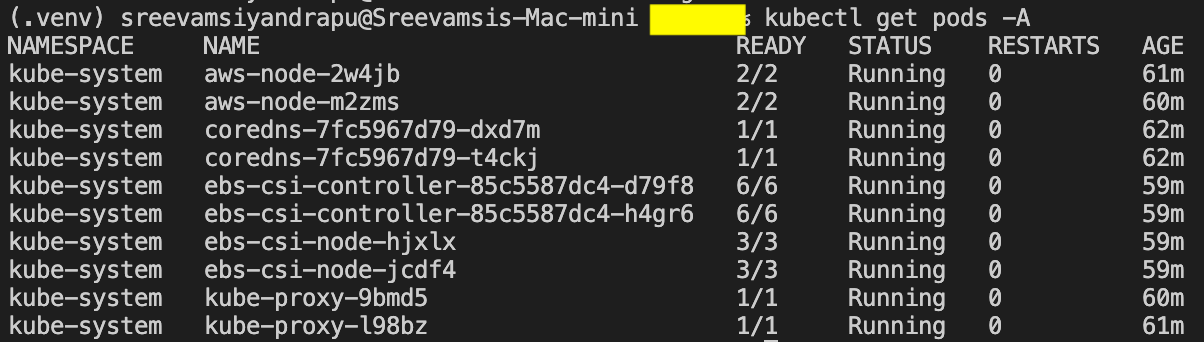
The lab ran on a small EKS cluster created with Terraform. The exact node size is not important for this topic; the important part is that the cluster was healthy and ready to schedule pods.
Useful verification commands:
kubectl get nodes -o wide
kubectl get pods -A
Job vs Deployment
A Deployment is used when the goal is:
- Keep this app running
- Maintain N replicas
- Replace failed pods continuously
A Job is different. A Job is used when the goal is:
- Run this task
- Wait for successful completion
- Retry if it fails, depending on policy
- Stop when the task is done
The mental model is:
Deployment = keep running
Job        = run to completion
CronJob    = run Jobs on a schedule
A Simple Successful Job
I started with a basic Job that prints two log lines and exits successfully.
apiVersion: batch/v1
kind: Job
metadata:
  name: hello-job
spec:
  template:
    spec:
      containers:
        - name: hello
          image: busybox
          command:
            - /bin/sh
            - -c
          args:
            - echo "hello from job"; sleep 30; echo "job done"
      restartPolicy: Never
  backoffLimit: 2
Apply it:
kubectl apply -f simple-job.yaml
kubectl get jobs
kubectl get pods
kubectl logs job/hello-job
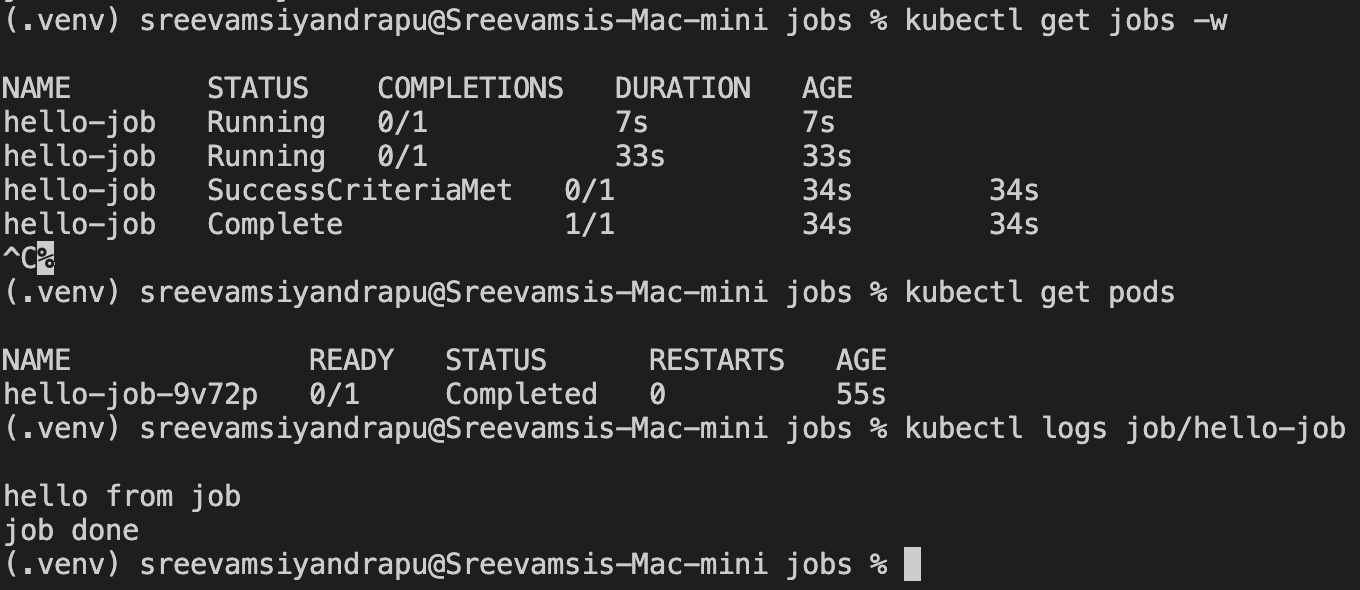
The Job first appeared as running:
STATUS    COMPLETIONS
Running   0/1
Then it completed:
STATUS     COMPLETIONS
Complete   1/1
The pod moved to Completed, which is expected. For a Job, a completed pod is not a problem. It means the task finished.
Example logs:
hello from job
job done
Understanding restartPolicy and backoffLimit
Jobs have two important retry-related fields:
restartPolicybackoffLimit
For Jobs, restartPolicy can be:
Never
OnFailure
It cannot be Always. Always is for long-running workload controllers like Deployments.
restartPolicy: Never
With restartPolicy: Never, if the container exits with a failure:
- The pod fails
- The Job controller may create another pod
- Each failed attempt is visible as a separate failed pod
This is easy to reason about when learning or debugging.
restartPolicy: OnFailure
With restartPolicy: OnFailure, if the container exits with a failure:
- The container may restart inside the same pod
- You may see the pod
RESTARTScount increase - The Job can still eventually fail if it never completes successfully
This can be useful, but it is less visually obvious than Never.
backoffLimit
backoffLimit controls how many failed attempts the Job tolerates before giving up.
If omitted, Kubernetes uses a default. Omitting it does not mean infinite retries.
A Failing Job with backoffLimit
To see retry behavior, I created a Job that always exits with status code 1.
apiVersion: batch/v1
kind: Job
metadata:
  name: failing-job
spec:
  backoffLimit: 2
  template:
    spec:
      containers:
        - name: fail
          image: busybox
          command:
            - /bin/sh
            - -c
          args:
            - echo "attempting job"; exit 1
      restartPolicy: Never
Apply and inspect:
kubectl apply -f failing-job.yaml
kubectl get jobs -w
kubectl get pods
kubectl describe job failing-job
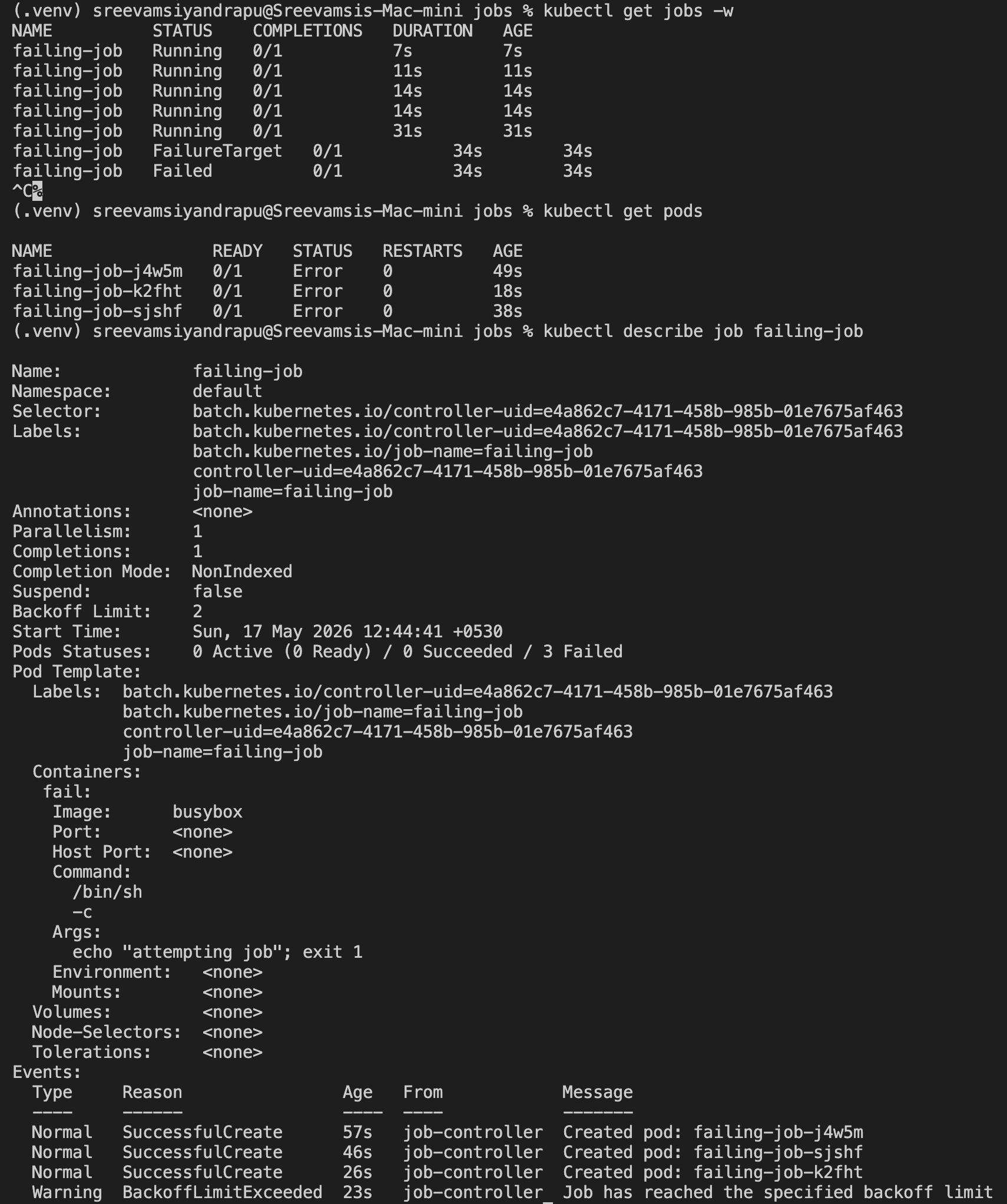
Because the command exits with 1, each attempt fails. Since restartPolicy is Never, Kubernetes creates new pods for retries until the retry budget is exhausted.
The important behavior:
Job creates pod
Pod fails
Job retries
Retry budget is exhausted
Job becomes Failed
CronJob Basics
A CronJob creates Jobs on a schedule.
The hierarchy is:
CronJob -> Job -> Pod
The CronJob does not run the container directly. It creates a Job, and the Job creates the pod that performs the task.
Example:
apiVersion: batch/v1
kind: CronJob
metadata:
  name: hello-cron
spec:
  schedule: "*/1 * * * *"
  jobTemplate:
    spec:
      template:
        spec:
          containers:
            - name: hello
              image: busybox
              command:
                - /bin/sh
                - -c
              args:
                - date; echo "hello from cronjob"
          restartPolicy: Never
Apply and inspect:
kubectl apply -f simple-cron.yaml
kubectl get cronjobs
kubectl get jobs
kubectl logs job/<job-name>
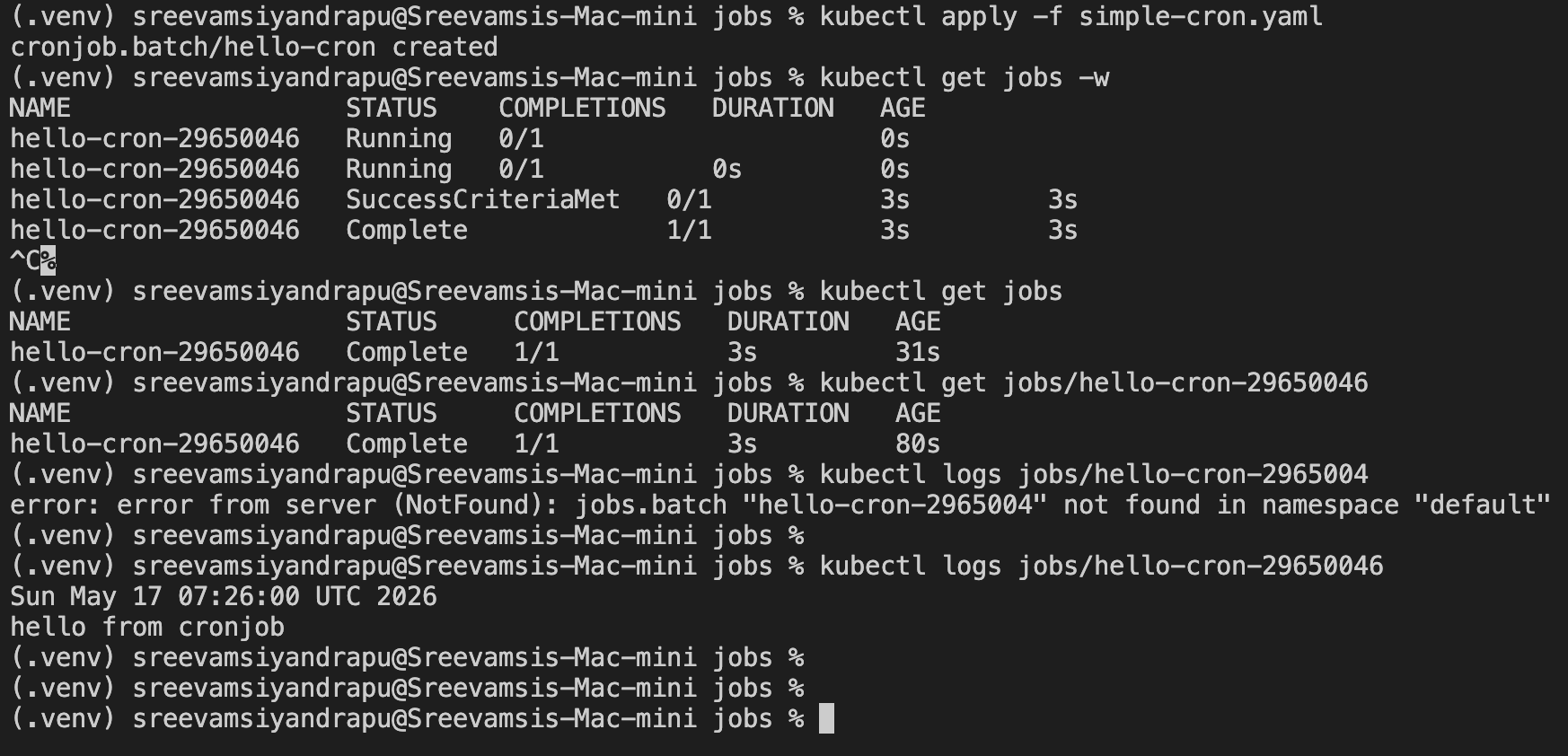
Example output:
Fri May 15 05:25:00 UTC 2026
hello from cronjob
CronJob concurrencyPolicy
concurrencyPolicy controls what happens when a new scheduled run starts while the previous run is still active.
There are three values:
Allow
Forbid
Replace
To make the behavior visible, I used CronJobs that run every minute but sleep for 90 seconds. That means a new schedule occurs before the previous Job finishes.
concurrencyPolicy: Allow
Allow is the default. It permits overlapping Jobs.
apiVersion: batch/v1
kind: CronJob
metadata:
  name: allow-cron
spec:
  schedule: "*/1 * * * *"
  concurrencyPolicy: Allow
  successfulJobsHistoryLimit: 2
  failedJobsHistoryLimit: 2
  jobTemplate:
    spec:
      template:
        spec:
          containers:
            - name: slow
              image: busybox
              command:
                - /bin/sh
                - -c
              args:
                - date; echo "starting allow cron"; sleep 90; echo "finished allow cron"
          restartPolicy: Never
Expected behavior:
- A run starts every minute
- Each run lasts 90 seconds
- Jobs can overlap
To watch this:
kubectl get jobs -w
Use this when overlap is acceptable.
concurrencyPolicy: Forbid
Forbid skips a new run if the previous one is still active.
apiVersion: batch/v1
kind: CronJob
metadata:
  name: forbid-cron
spec:
  schedule: "*/1 * * * *"
  concurrencyPolicy: Forbid
  successfulJobsHistoryLimit: 2
  failedJobsHistoryLimit: 2
  jobTemplate:
    spec:
      template:
        spec:
          containers:
            - name: slow
              image: busybox
              command:
                - /bin/sh
                - -c
              args:
                - date; echo "starting slow cron"; sleep 90; echo "finished slow cron"
          restartPolicy: Never
Expected behavior:
- A schedule fires every minute
- The Job runs for 90 seconds
- A new run is skipped if the previous run is still active
To inspect this:
kubectl get cronjob forbid-cron
kubectl describe cronjob forbid-cron
kubectl get jobs -w
Use this for tasks that must not overlap, such as backups or database maintenance.
concurrencyPolicy: Replace
Replace cancels the currently running Job and starts a new one.
apiVersion: batch/v1
kind: CronJob
metadata:
  name: replace-cron
spec:
  schedule: "*/1 * * * *"
  concurrencyPolicy: Replace
  successfulJobsHistoryLimit: 2
  failedJobsHistoryLimit: 2
  jobTemplate:
    spec:
      template:
        spec:
          containers:
            - name: slow
              image: busybox
              command:
                - /bin/sh
                - -c
              args:
                - date; echo "starting replace cron"; sleep 90; echo "finished replace cron"
          restartPolicy: Never
Expected behavior:
- A schedule fires every minute
- The previous active run is replaced
- Only the latest run matters
To watch replacement behavior:
kubectl get jobs -w
kubectl get pods -w
Use this when stale runs are not useful and the newest execution should win.
CronJob History Limits
CronJobs can create many Jobs over time. Without cleanup, old Jobs can pile up.
These fields control retained history:
successfulJobsHistoryLimit: 2
failedJobsHistoryLimit: 2
Meaning:
- Keep the last 2 successful Jobs
- Keep the last 2 failed Jobs
This keeps the namespace easier to inspect.
Useful Commands
Inspect Jobs:
kubectl get jobs
kubectl describe job <job-name>
Inspect CronJobs:
kubectl get cronjobs
kubectl describe cronjob <cronjob-name>
View logs:
kubectl logs job/<job-name>
Follow logs:
kubectl logs -f job/<job-name>
Clean up:
kubectl delete job hello-job failing-job --ignore-not-found
kubectl delete cronjob hello-cron allow-cron forbid-cron replace-cron --ignore-not-found
Key Takeaways
Use a Job when the workload should run to completion.
Use a CronJob when the workload should run on a schedule.
Use restartPolicy: Never when you want failed attempts to be visible as separate failed pods.
Use restartPolicy: OnFailure when restarting inside the same pod is acceptable.
Use backoffLimit to control how many failed attempts a Job gets before it is marked failed.
Use concurrencyPolicy to control overlapping scheduled runs:
Allow   = overlapping runs are allowed
Forbid  = skip new run if old one is still active
Replace = terminate old run and start a new one
For production CronJobs, set history limits so old Jobs do not accumulate indefinitely.
Final Mental Model
Deployment:
  Keep this application running.

Job:
  Run this task until it succeeds or fails.

CronJob:
  Create Jobs on a schedule.
That distinction is the core of Kubernetes batch workload management.