A Hands-On Hello World With Strands, Nova, and AWS Tools
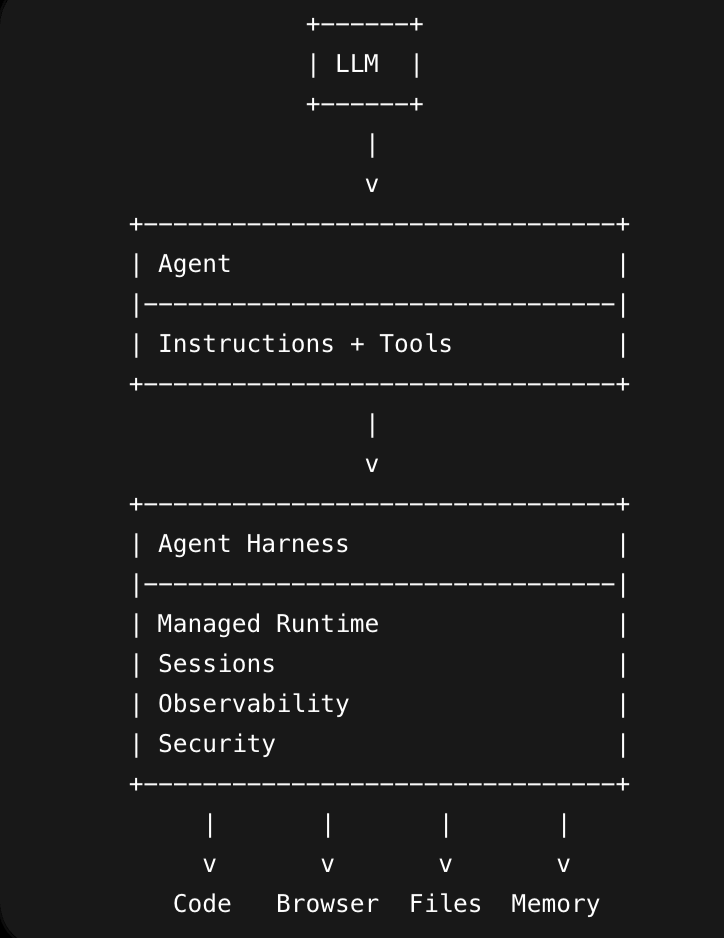
I wanted to understand agents in the most practical way possible: not by reading definitions, but by building a tiny one in my own AWS account. The goal was simple:
- Create a local Strands agent.
- Deploy an Amazon Bedrock AgentCore Harness.
- Add a real runtime agent.
- Give the agent a tool.
- Let the deployed agent call AWS safely.
By the end, the agent could answer prompts, remember context within a session, use Amazon Nova 2 Lite, and call a read-only S3 tool from inside AgentCore.
The Mental Model
The most useful way to think about the stack is:
LLM:
  A model that can generate text.

Agent:
  A model plus instructions plus tools.

Strands:
  A Python SDK for defining agents and tools.

Harness:
  The managed runtime around the agent.
The agent is the worker. The harness is the workspace around it: model access, sessions, memory, tools, network, filesystem, limits, deployment, logs, and IAM.
That separation matters. A local Python agent can use my laptop credentials. A deployed AgentCore runtime uses its own AWS execution role.
Starting With A Local Strands Agent
The smallest Strands agent looked like this:
from strands import Agent
from strands.models.bedrock import BedrockModel

SYSTEM_PROMPT = """
You are a patient AWS agents coach.
Explain things simply, then give one concrete next step.
"""

model = BedrockModel(
    model_id="us.amazon.nova-2-lite-v1:0",
    region_name="us-west-2",
)

agent = Agent(
    model=model,
    system_prompt=SYSTEM_PROMPT,
)

agent("Hello! Explain what an AI agent is in one paragraph.")
Running it produced:
python hello_agent.py
### Understanding AI Agents

An **AI agent** is a software program or system designed to **autonomously perceive its environment, make decisions, and take actions** to achieve specific goals. Think of it like a virtual assistant that can sense what's happening (like reading data or user inputs), think through the situation (using algorithms or machine learning), and act on it (such as sending a notification or performing a task). AI agents can operate in various environments -- from your smartphone to large data centers -- and they're often used to automate complex, repetitive, or decision-heavy tasks. They range from simple rule-based systems to advanced learning-based agents that improve over time.

---

### One Concrete Next Step

**Start small:** Pick a simple task you repeat often (like sorting emails or setting reminders) and try to automate it using an existing AI tool or service (e.g., Zapier, Google Assistant, or an AWS Lambda function with AI services). This hands-on experience will help you see how AI agents work in practice and build your confidence to tackle more complex projects later.
This proved the first idea: an agent can be as small as an explicitly configured model plus a system prompt.
Then I added tools.
from strands import Agent, tool
from strands.models.bedrock import BedrockModel

model = BedrockModel(
    model_id="us.amazon.nova-2-lite-v1:0",
    region_name="us-west-2",
)

@tool
def get_account_alias() -> str:
    """Return a friendly fake account label for the demo."""
    return "practice-aws-account"

@tool
def estimate_bedrock_cost(request_count: int) -> str:
    """Give a toy cost warning. This is intentionally not real pricing."""
    if request_count <= 10:
        return "Tiny practice run. Still check Bedrock usage in AWS Billing."
    return "Larger practice run. Set a budget alert before continuing."

agent = Agent(
    model=model,
    system_prompt="You are an AWS practice assistant. Use tools when they help.",
    tools=[get_account_alias, estimate_bedrock_cost],
)

agent(
    "What account am I practicing in, and what should I know before making 12 Bedrock calls?"
)
Running the tool agent showed the model choosing both tools:
python tool_agent.py
Sure! Let me fetch both pieces of information at the same time.
Tool #1: get_account_alias

Tool #2: estimate_bedrock_cost
Here is what you need to know before proceeding:

- You are currently working in the account labeled **practice-aws-account**, which is a demo/practice environment.
- The cost estimator flagged 12 Bedrock calls as a "larger practice run" and recommends setting a budget alert before continuing.
- Set up an AWS Budgets alert in the console to cap unexpected spend; this is especially important when calling managed AI services like Bedrock.
- Bedrock charges are based on factors such as the model selected, input/output token counts, and inference mode -- review the official AWS Bedrock pricing page for current rates before running calls.
- Make sure your IAM role or user has the correct `bedrock:InvokeModel` permissions scoped to only the models you need, to avoid unintended access or runaway usage.
That was the first real agent behavior: the model decided to call tools, observed their results, and then answered.
Creating The AgentCore Harness
Next, I used the AgentCore CLI:
agentcore create
I selected a harness-first project. That created:
HelloHarness/
  app/MyHarness/
  agentcore/
The harness was named:
MyHarness
The first model was Claude, but I later switched to Amazon Nova 2 Lite.
The first deployment was:
cd strands-hello/HelloHarness
agentcore deploy
After deployment, I invoked the harness:
agentcore invoke \
  --harness MyHarness \
  --session-id "$(uuidgen)" \
  "Say hello in one sentence."
The harness responded:
Hello! How can I assist you today?

Session: F2980AB2-788A-4B69-921B-7F2C97340E27
To resume: agentcore invoke --session-id F2980AB2-788A-4B69-921B-7F2C97340E27
This worked, but I learned one small rule along the way: AgentCore session IDs must be long enough. A short value like hello-001 failed. A UUID worked.
Harness vs Runtime Agent
One confusing but important discovery: I could invoke the harness before adding a separate agent.
That is because the managed harness itself can run a model loop using its model, prompt, tools, and session configuration.
Later, I added a generated runtime agent:
agentcore add
The agent was named:
CoachAgent
The invocation command changed from --harness to --runtime:
agentcore invoke \
  --runtime CoachAgent \
  --session-id "$(uuidgen)" \
  "Explain agents, Strands, and harnesses in 3 short bullets."
The runtime agent responded:
### Agents, Strands, and Harnesses - Simplified

- **Agents**: AI systems that combine a language model with tools and reasoning to perform tasks autonomously. They can understand requests, decide on actions, and interact with the world via tools.

- **Strands**: An open-source SDK (Software Development Kit) that provides building blocks for creating AI agents. It simplifies developing agent loops, integrating tools, handling multi-agent systems, and managing observability.

- **Harnesses**: The infrastructure and code surrounding the AI model that enables it to function as an agent. This includes tool execution, memory management, context handling, safety enforcement, and error recovery -- essentially everything that makes the model useful beyond just generating text.

Session: 519A800F-D559-46C9-A04E-6E64FBBA86A4
To resume: agentcore invoke --session-id 519A800F-D559-46C9-A04E-6E64FBBA86A4
The difference became:
--harness MyHarness:
  Invokes the managed harness loop.

--runtime CoachAgent:
  Invokes my deployed Python runtime agent.
Switching To Amazon Nova 2 Lite
I wanted to use Amazon Nova Lite/Nova 2 Lite for cheaper practice.
The base model ID did not work for on-demand invocation:
amazon.nova-2-lite-v1:0
Bedrock returned an error saying on-demand throughput was not supported and that I should use an inference profile.
The working inference profile was:
us.amazon.nova-2-lite-v1:0
The key idea:
Base model ID:
  amazon.nova-2-lite-v1:0

Inference profile ID:
  us.amazon.nova-2-lite-v1:0
The inference profile is the supported on-demand address for the model.
For the harness, I updated:
strands-hello/HelloHarness/app/MyHarness/harness.json
For the runtime agent, I updated:
strands-hello/HelloHarness/app/CoachAgent/model/load.py
The runtime model loader became:
from strands.models.bedrock import BedrockModel


def load_model() -> BedrockModel:
    """Get Bedrock model client using IAM credentials."""
    return BedrockModel(
        model_id="us.amazon.nova-2-lite-v1:0",
        region_name="us-west-2",
    )
Then I redeployed:
agentcore deploy
Testing Session Context
I tested whether the harness remembered context.
First, I reused the same session ID:
agentcore invoke \
  --harness MyHarness \
  --session-id 49CD318D-C579-4441-84C1-F3AD82D4966B \
  "My name is Sree. Remember that for this session."
The harness acknowledged the name:
Hello Sree! I'll remember your name for this session. How can I assist you today? Whether you need help with file operations, running commands, or any other tasks, I'm here to support you. Just let me know what you'd like to work on!

Session: 49CD318D-C579-4441-84C1-F3AD82D4966B
To resume: agentcore invoke --session-id 49CD318D-C579-4441-84C1-F3AD82D4966B
Then:
agentcore invoke \
  --harness MyHarness \
  --session-id 49CD318D-C579-4441-84C1-F3AD82D4966B \
  "What is my name?"
It remembered within the same session:
Hello Sree! As per our conversation, your name is **Sree**. I'm remembering that for this session. How can I assist you further today?

Session: 49CD318D-C579-4441-84C1-F3AD82D4966B
To resume: agentcore invoke --session-id 49CD318D-C579-4441-84C1-F3AD82D4966B
It remembered the name.
Then I used a new session:
agentcore invoke \
  --harness MyHarness \
  --session-id "$(uuidgen)" \
  "What is my name?"
It did not remember.
That proved the difference:
Session context:
  Available when reusing the same session ID.

Persistent memory:
  Available across different sessions only if memory is enabled and configured.
For this hello world, persistent memory stayed disabled.
Adding Tools To CoachAgent
The generated runtime code lived here:
strands-hello/HelloHarness/app/CoachAgent/main.py
I added a simple practice-cost tool:
@tool
def estimate_practice_cost(call_count: int) -> str:
    """Give a simple practice-cost warning based on call count."""
    if call_count <= 5:
        return "Small practice run. Keep prompts short and check billing later."
    return "Larger practice run. Set an AWS Budget alert before continuing."

tools.append(estimate_practice_cost)
Then I redeployed and invoked the runtime:
agentcore invoke \
  --runtime CoachAgent \
  --session-id "$(uuidgen)" \
  "I plan to make 8 Bedrock practice calls. Use a tool if helpful, then give me one short recommendation."
The result was exactly what I wanted: the model used the tool and then responded with the tool result.
Adding A Read-Only AWS Tool
The next tool listed S3 buckets:
@tool
def list_s3_buckets() -> list[str]:
    """List S3 bucket names in this AWS account."""
    import boto3

    s3 = boto3.client("s3")
    response = s3.list_buckets()
    return [bucket["Name"] for bucket in response.get("Buckets", [])]

tools.append(list_s3_buckets)
I invoked it:
agentcore invoke \
  --runtime CoachAgent \
  --session-id "$(uuidgen)" \
  "List my S3 buckets and summarize what you found in one sentence."
It failed with a permission error:
s3:ListAllMyBuckets
That was the most useful failure of the exercise.
The Runtime Role Lesson
My local AWS identity could deploy and invoke, but the deployed agent does not use my local identity when it calls S3.
It uses the AgentCore runtime execution role.
The role for CoachAgent was:
arn:aws:iam::<account-id>:role/<agentcore-runtime-execution-role>
For the demo, I added the minimum permission manually:
aws iam put-role-policy \
  --role-name AgentCore-HelloHarness-de-ApplicationAgentCoachAgen-BQBqHzUOj4nC \
  --policy-name CoachAgentS3ListBucketsPractice \
  --policy-document '{
    "Version": "2012-10-17",
    "Statement": [
      {
        "Effect": "Allow",
        "Action": "s3:ListAllMyBuckets",
        "Resource": "*"
      }
    ]
  }'
After that, the S3 tool worked.
The clean long-term fix is to move that permission into the CDK infrastructure so agentcore deploy owns it. The manual policy was useful as a learning unblock, but durable infrastructure should avoid drift.
What Was Completed
By the end of the exercise, these pieces were working:
- Local Strands agent
- Local Strands tool calling
- AgentCore harness creation
- Harness deployment
- Harness invocation
- Session context testing
- Amazon Nova 2 Lite through an inference profile
- Runtime agent creation
- Runtime invocation with
--runtime - Custom tool calling
- Read-only AWS tool calling
- Runtime-role IAM debugging
The final deployed flow looked like this:
User prompt
  -> CoachAgent runtime
  -> Nova 2 Lite
  -> model chooses a tool
  -> tool calls AWS using the runtime execution role
  -> model summarizes the result
Cleanup
After finishing the lab, I removed the harness resources:
agentcore remove harness
Then I ran deploy one final time:
agentcore deploy
In this case, the final deploy was not for changing configuration or continuing the lab. It completed the cleanup after the harness was removed, so the runtime resources would not keep running and billing.
Cost Note
This lab cost around 15 cents in total, including Bedrock AgentCore runtime usage and model invocations.
Final Takeaway
The exercise started as “hello world,” but it ended with the real shape of production agent work:
Agent behavior is code.
Tool access is IAM.
Runtime behavior is infrastructure.
Sessions are not the same as persistent memory.
Model IDs are not always invocation IDs.
That is the useful mental model I wanted: agents are not magic chatbots. They are applications with prompts, tools, state, permissions, deployment, and cost.